
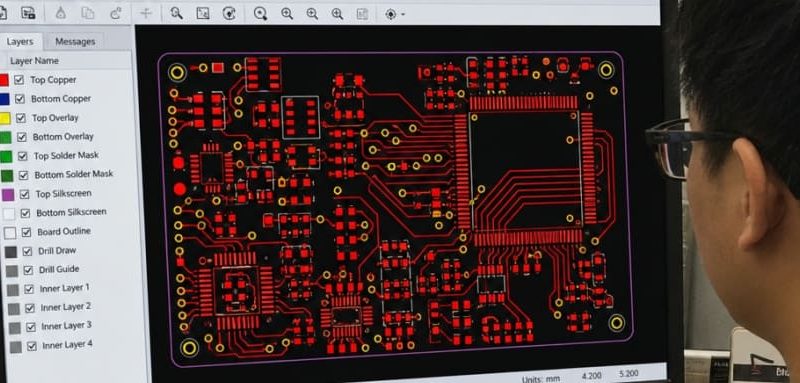
A clean Gerber package turns your PCB design files into clear manufacturing instructions. At Fuxin PCBA, we receive Gerber packages every day from engineers and procurement teams around the world — and we see the same avoidable issues again and again: missing outlines, unclear layer names, mismatched drill data, outdated revisions. Fuxin PCBA will explains what to prepare, what to check, and how to move from layout to quote request with fewer delays. If you are preparing Gerber files for PCB manufacturing, the goal is simple: give the fabricator complete, readable, production-ready PCB fabrication files.
What Should Your Gerber Package Include?
A production-ready Gerber package should include every layer and support file needed to fabricate the bare board, not just the visible copper artwork. Gerber is maintained through official specifications from Ucamco, which provides current Gerber layer format documentation and related resources for developers and PCB manufacturers. The official Ucamco download page lists the Gerber Layer Format Specification, including a 2026.05 revision, making it a reliable reference point for current Gerber file formats.
A typical package includes:
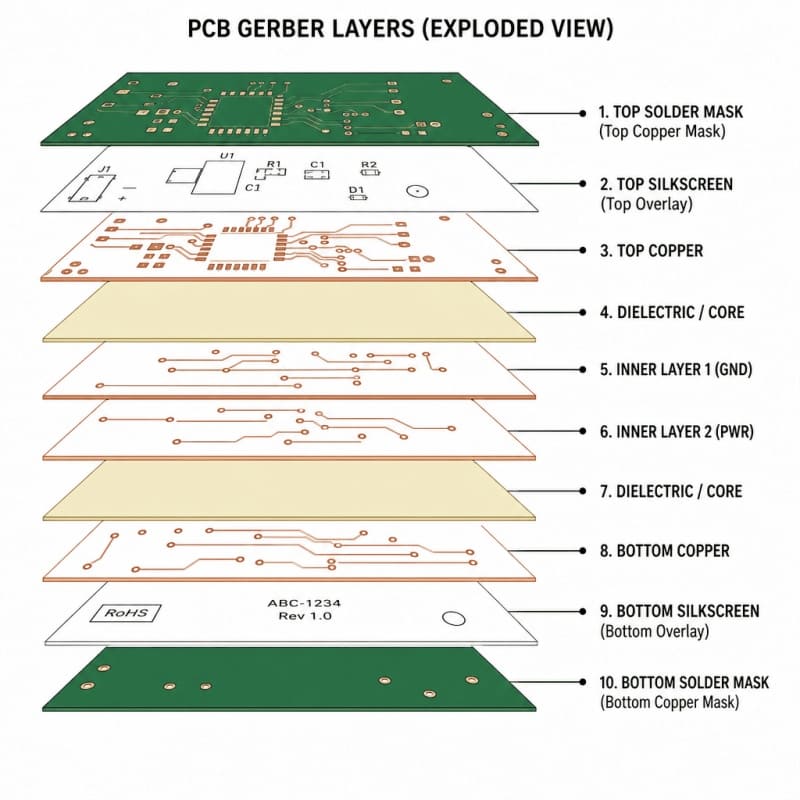
Top and bottom copper layers showing traces, pads, copper pours, and connection geometry.
Inner copper layers for multilayer boards, clearly named in the correct stack order.
Solder mask layers defining exposed copper areas for soldering.
Silkscreen layers for reference designators, polarity marks, logos, and labels.
Paste layers when the project will use stencil-based SMT assembly.
Board outline or mechanical layer showing the finished shape, slots, cutouts, and routing details.
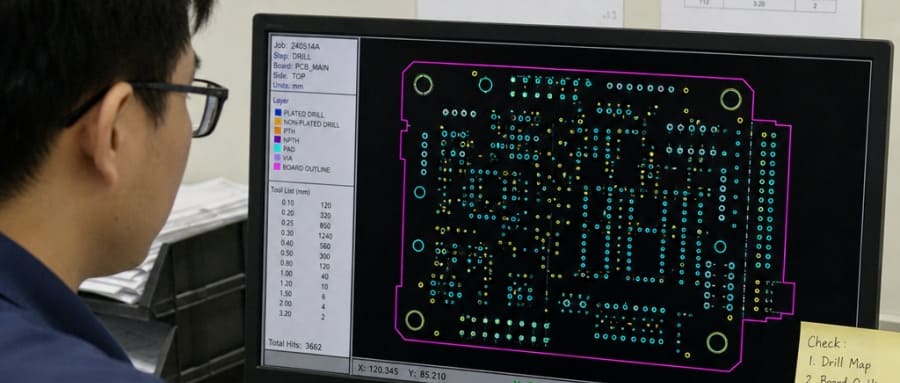
NC drill files for plated and non-plated holes, with clear units and tool data.
Fabrication notes or readme file explaining stack-up, copper weight, finish, impedance needs, and any special instructions.
When one of these files is missing or mislabeled, the PCB manufacturing process can pause while engineers ask for clarification. That delay is preventable. A complete package helps the production team confirm the board outline, drill data, layer order, and mask openings before tooling begins.
 Gerber Files Turn Design Intent Into Manufacturing Action
Gerber files are not the same as editable PCB design files. Your design software may store schematics, component libraries, placement data, and routing rules, while the exported Gerber set communicates the finished artwork layer by layer. That distinction matters because a fabricator usually works from the exported production data, not from your internal design environment.
In practical terms, Gerber is the language that describes what copper stays, what mask opens, and what markings appear on the board. It does not automatically explain every design decision, so the surrounding file package must fill in the gaps. For example, if the outline layer shows a routed slot but the drill file omits it, the production team needs clarification before proceeding.
For buyers and engineers, this is where good PCB design tips become cost-saving habits. Confirm the board outline, verify the drill map, run DRC checks, and view the exported data in independent Gerber file software before sending files for quotation.
 Strong File Preparation Reduces Quoting and Production Friction
A clear file package makes the first engineering review faster and more accurate. Instead of guessing whether a layer is top copper or inner layer 2, the reviewer can validate the stack-up and focus on manufacturability. This is especially useful for prototypes, small-batch builds, and design revisions where speed and clarity matter.
Use this preparation checklist before sending files:
Export from the final approved PCB layout, not from an earlier revision.
Use consistent file names such as TopCopper, BottomMask, Drill_PTH, and BoardOutline.
Confirm units and format settings so drill and Gerber coordinates align.
Open the exported files in a separate viewer instead of relying only on the native PCB editor.
Compare the Gerber view with your intended layout for missing copper, reversed text, mask errors, and outline mismatch.
Include fabrication requirements such as board thickness, surface finish, copper weight, solder mask color, and quantity.
Remove obsolete versions from the upload folder to avoid confusion.
These steps are simple, but they protect the project from avoidable back-and-forth. The best Gerber export is not merely technically valid; it is organized enough for another team to understand without interpreting your intentions.
File Formats and Standards Support Better Handoff
The Gerber ecosystem has evolved from simple image data toward richer production context. Ucamco’s official Gerber resources include references to X2 and X3 materials, while IPC-2581 is an IPC standard for transferring printed board design and manufacturing description data through a more complete digital product model.
For many fabrication orders, Gerber remains widely used because it is familiar, human-readable in structure, and supported by common CAM workflows. IPC-2581 can carry broader design-to-manufacturing information, but supplier capability and project requirements determine whether it is needed. If you are unsure which format to submit, ask your manufacturer what their front-end engineering team prefers.
For a smooth handoff, Fuxin PCBA recommends treating your files as a controlled manufacturing package. Name the revision, lock the approved design, and keep notes close to the fabrication data. That discipline is especially helpful when the same project moves from prototype validation to repeat orders.
Practical PCB Design Tips Before Export
Gerber quality begins before you click export. The design rules, footprints, layer setup, and documentation choices inside your CAD tool all influence how cleanly the board can be manufactured. A last-minute export cannot fix a missing outline, poor annular ring, or unclear stack-up.
Focus on these design habits:
Design to the manufacturer’s capabilities. Match trace width, spacing, drill size, solder mask bridge, and via rules to the production option you plan to use.
Keep polarity and orientation visible. Diodes, LEDs, IC pin 1 markers, and connector orientation marks should be clear on the silkscreen where space allows.
Avoid ambiguous mechanical data. Put the final board edge, slots, panel marks, and cutouts on a dedicated outline or mechanical layer.
Check solder mask expansion. Pads should expose correctly without opening nearby copper unintentionally.
Validate drill data. Confirm plated and non-plated holes, slots, and mounting holes are identified correctly.
Review text direction. Mirrored bottom silkscreen is normal in design tools, but exported manufacturing views should still be checked.
A Real Example: When a Missing Outline Delays Production
One common before-and-after case at Fuxin PCBA involves a two-layer controller board with correct copper files but no clear board outline. Before correction, the fabricator must ask whether the edge cuts are in the mechanical layer, silkscreen, or drawing notes — adding one to two days to the quote cycle. After the customer added a named BoardOutline file and a short readme, the same project moved directly into engineering review and was quoted the same day. Small fix, measurable delay saved.
How Fuxin PCBA Helps You Prepare for Production
Fuxin PCBA supports customers who need a practical path from exported files to PCB production inquiry. Instead of asking you to become a CAM engineer, the process focuses on receiving complete data, identifying unclear items, and helping you move forward with confidence. The better your starting package, the faster the technical review can become actionable.
When you contact the team, prepare:
Your zipped Gerber and drill files
Board dimensions and layer count
Quantity and target use case
Material, thickness, copper weight, and finish preferences if known
Assembly needs, if you want PCBA support in addition to bare board fabrication
Any notes about impedance, panelization, testing, or special handling
If some details are not final, say so clearly. A transparent note is better than a hidden assumption. The team can then review the available information and request only the details needed for the next step.
The Inquiry Process Is Simple and Production-Focused
A good landing-page promise should be clear: send the files, confirm the requirements, and get the conversation moving. Your inquiry does not need to be perfect, but it should be complete enough for a meaningful review. This makes the response more useful and reduces repeated clarification emails.
Here is a simple workflow:
Upload or send your PCB fabrication files. Include Gerber, drill, outline, and notes in one compressed folder.
Share production requirements. Add quantity, lead-time expectations, materials, finish, and assembly scope if applicable.
Receive engineering feedback. The review can identify missing files, unclear layer naming, or manufacturability questions.
Confirm details before production. Approve the corrected information so the final build reflects the intended design.
Ready to move from layout to manufacturing review? Prepare your Gerber package and contact Fuxin PCBA for a production inquiry.